🌊 Tide

Information moves like the tide. We pick the waves worth studying.

中文

← Today's tide

Published 2026-07-13 · ZJUNLP · Yijun Chen, Boyi Xiao, Yixian Zhao et al.

LightMem-Ego: Your AI Memory for Everyday Life

arXiv · HuggingFace · ▲47

Abstract (verbatim)

Personal AI assistants on mobile and wearable devices continuously perceive users' daily lives through visual and audio streams. However, answering queries about past experiences requires lightweight multimodal memory that can continuously accumulate, organize, and retrieve long-term experiences, which remains challenging. To address this challenge, we present LightMem-Ego, a lightweight streaming multimodal memory system for everyday-life assistance. The system continuously captures egocentric visual and audio streams, aligns them on a shared timeline, and organizes them into a hierarchical memory consisting of current, short-term, and long-term memory. Given a user query, LightMem-Ego dynamically routes retrieval to the appropriate memory level and generates answers grounded in multimodal evidence. The demonstration can be deployed on smartphones and AI glasses, supporting object finding, conversation recall, life summarization, routine discovery, and personalized assistance. Code is available at https://github.com/zjunlp/LightMem-Ego.

Background

With the widespread adoption of smartphones and smart glasses, personal AI assistants are becoming increasingly integral to our daily lives. These devices continuously capture users' visual and audio information, providing rich data on daily experiences for AI assistants. However, existing AI assistants still face challenges when handling queries related to users' past experiences.

In terms of technical background, this type of technology is mainly applied to personal memory assistance in daily life. For example, it can help users find lost items, recall recent conversations, summarize daily activities, and analyze long-term habits and routines. These functions can significantly improve users' quality of life and efficiency.

Previous problems mainly focused on three aspects: Firstly, daily experiences come in the form of continuous visual-audio streams without clear event boundaries, making it difficult for AI assistants to transform these raw observations into coherent event-level experiences. Secondly, how to effectively organize continuously accumulated experiences into current, short-term, episodic, and semantic memories while maintaining the efficiency of long-term deployment is also a challenge. Finally, user queries usually span multiple time ranges, requiring dynamic routing across different memory levels rather than relying on a single context window or flat retrieval storage.

To address these issues, this paper proposes the LightMem-Ego system. The system connects lightweight smartphone or smart glasses clients to a backend that receives egocentric visual-audio streams, divides recent observations into events, and organizes them into a three-level memory hierarchy: current memory for ongoing context, short-term memory for recent micro-events, and long-term memory for consolidated events and semantic facts. When answering questions, a memory router selects evidence based on the temporal scope and intent of the query, enabling the system to provide reliable answers about the present, recent past, and long-term routines in a unified interface.

The key difference from previous work is that LightMem-Ego adopts a streaming multimodal memory system approach, which can continuously capture, organize, retrieve, and reason about daily life experiences. This allows the system to better adapt to users' actual needs and provide more accurate and efficient assistance in various tasks.
Method, Figure by Figure

M E T H O D1 / 5

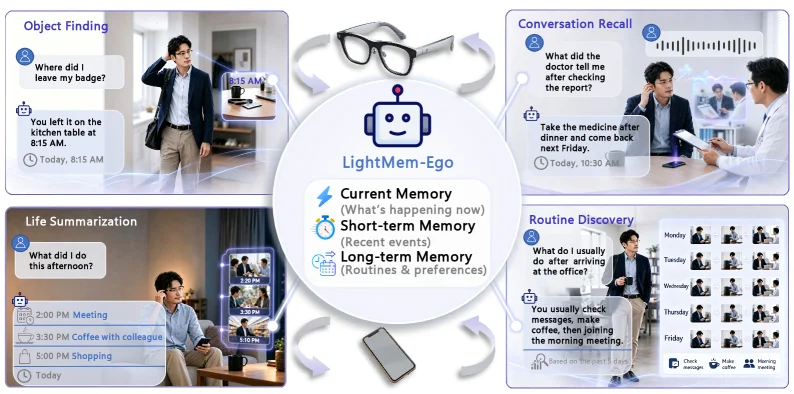
Figure 1: Overview of LightMem-Ego ’s motivating scenarios and memory hierarchy. The system supports everyday memory assistance across object finding, conversation recall, life summarization, and routine discovery by routing user queries to current, short-term, and long-term memory.

This figure (Figure 1) is the core schematic diagram of the paper "LightMem-Ego: Your AI Memory for Everyday Life," which clearly illustrates the core concept, memory hierarchy, and primary application scenarios of the LightMem-Ego system in daily life.

First, let's look at the central part of the image, labeled "LightMem-Ego," which features a robot icon symbolizing this AI system. Below the central area, three core memory levels of the system are clearly listed: 1. Current Memory (What's happening now): Represents the memory of what is currently happening, processing real-time, up-to-date information. 2. Short-term Memory (Recent events): Represents the memory of recent events, used to store and process events that have occurred in the recent past. 3. Long-term Memory (Routines & preferences): Represents long-term memory, primarily used to store user habits, preferences, and patterns of recurring events.

These three memory levels form the core architecture of the LightMem-Ego system. They are connected via arrows to four application scenario sections around them, indicating how the system retrieves different levels of memory to provide assistance based on user queries.

Next, we analyze the four main application scenario sections in the image:

  1. Top-left: Object Finding

    • Scenario description: A user is thinking, "Where did I leave my badge?" (Where did I leave my badge?). The system, through memory retrieval, provides an answer on the left: "You left it on the kitchen table at 8:15 AM today." (You left it on the kitchen table at 8:15 AM Today, 8:15 AM).
    • Information flow: The user's query (lost item) triggers memory retrieval in the system. In this scenario, the system likely primarily accessed short-term or current memory (if the event occurred recently), found specific location and time information related to the item, and presented it to the user in text form. The image also shows the user's environment at the time (office or home) and a device interface with a timestamp of 8:15 AM, which might be one of the sources from which the system obtained the information.
  2. Top-right: Conversation Recall

    • Scenario description: A user is thinking, "What did the doctor tell me after checking the report?" (What did the doctor tell me after checking the report?). The system, through memory retrieval, provides an answer on the right: "Take the medicine after dinner and come back next Friday." (Take the medicine after dinner and come back next Friday.).
    • Information flow: The user's query (recalling conversation content) triggers memory retrieval in the system. This scenario may require the system to extract specific conversation content from short-term or long-term memory. The image shows a conversation scene between the user and the doctor, as well as a device interface with a timestamp of 10:30 AM, which might be the time the conversation occurred or when the system recorded it.
  3. Bottom-left: Life Summarization

    • Scenario description: A user is thinking, "What did I do this afternoon?" (What did I do this afternoon?). The system, through memory retrieval, provides a timeline-based summary on the left: "2:00 PM Meeting" (2:00 PM Meeting), "3:30 PM Coffee with colleagues" (3:30 PM Coffee with colleagues), "5:00 PM Shopping" (5:00 PM Shopping).
    • Information flow: The user's query (summarizing daily activities) triggers memory retrieval in the system, particularly a combination of short-term and long-term memory. The system organizes key events of the day in chronological order and presents them to the user. The image shows a user sitting on a sofa with a mobile phone nearby, possibly representing the input device for the query or the device displaying the results.
  4. Bottom-right: Routine Discovery

    • Scenario description: A user is thinking, "What do I usually do after arriving at the office?" (What do I usually do after arriving at the office?). The system, through memory retrieval, provides an answer on the right: "You usually check messages, make coffee, then join the morning meeting." (You usually check messages, make coffee, then join the morning meeting.).
    • Information flow: The user's query (understanding personal daily habits) triggers long-term memory retrieval in the system. The system analyzes the user's past behavior patterns, identifies sequences of recurring activities, and presents them to the user in a generalized way. The image shows a calendar view with activity snapshots from different days, which might represent the data source used by the system to discover habits.

Order of data or information flow: The user's query (such as object finding, conversation recall, etc.) is first received by the system. Then, based on the nature of the query (whether it's about an immediate event, a recent event, or a long-term habit), the system dynamically routes the retrieval request to the appropriate memory level (current memory, short-term memory, or long-term memory). The system searches for relevant multimodal information (visual, audio, etc.) within these memory levels. After finding the relevant information, the system integrates it and generates a response based on multimodal evidence, which is then presented to the user. The arrows in the figure indicate the direction of this process, from the user's query to memory retrieval and then to response generation.

How the method specifically works, as revealed by this figure: This figure intuitively demonstrates the workflow of the LightMem-Ego system: * Multimodal data capture: The system continuously captures the user's visual and audio streams through wearable devices (such as AI glasses) or mobile devices. * Hierarchical memory organization: The captured data is aligned to a shared timeline and organized into a hierarchical memory structure, including current memory (processing immediate information), short-term memory (processing recent events), and long-term memory (processing habits and preferences). * Dynamic query routing: When a user submits a query, the system intelligently selects the appropriate memory level for retrieval based on the type of query (for example, finding a lost item might require short-term memory, while understanding daily habits might require long-term memory). * Multimodal evidence generation: The system retrieves relevant information from the selected memory level and combines multimodal evidence (such as images, text, timestamps) to generate an accurate and contextualized response. * Support for various applications: The system is designed to support multiple daily life assistance tasks, such as those shown in the figure: object finding, conversation recall, life summarization, and routine discovery.

In summary, this figure clearly conveys how the LightMem-Ego system, as a lightweight streaming multimodal memory system, provides personalized daily life memory assistance to users through hierarchical memory and dynamic query routing. It demonstrates the system's practicality and effectiveness through four specific application scenario examples.

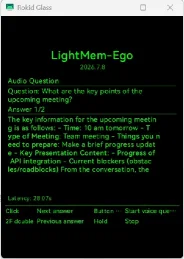
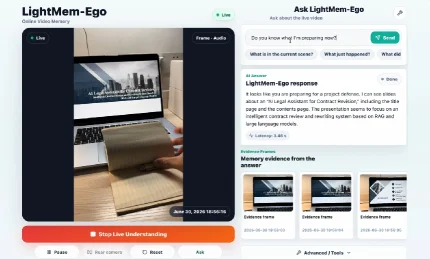
(a) Web client. (b) Glasses app UI. (c) First-person overlay. Figure 2: Interfaces of LightMem-Ego across web and wearable deployments. The web client visualizes live multimodal capture and retrieved evidence; the glasses client app provides a lightweight interaction surface; and the first-person overlay illustrates how memory-grounded responses are presented in the user’s egocentric view.

This image showcases the web client interface of the LightMem-Ego system proposed in the paper LightMem-Ego: Your AI Memory for Everyday Life, intuitively illustrating how the system processes users' daily multimodal data and provides memory-based responses.

Left Section: Real-time Multimodal Capture Area

At the top, a "Live" label indicates a real-time video stream. The central area displays a laptop screen and a hand flipping through a notebook—representing the egocentric visual stream captured by the system’s camera. Below the video stream, a timestamp ("June 30, 2024 18:50:59") records the current moment. A prominent red button labeled "Stop Live Understanding" stops real-time data capture and processing. Below it, control buttons like "Pause," "Rear camera," "Reset," and "Ask" allow user interaction.

Right Section: User Query and System Response Area

The top section, titled "Ask LightMem-Ego," includes an input box prompting users to "Ask about the live video." The example query shown is "Do you know why I'm preparing now?" Below the input box, quick-query options like "What is in the current scene?", "What just happened?", and "What did I..." simplify rapid questioning.

The "AI Answer" section (titled "LightMem-Ego response") displays the system’s reply: "It looks like you are preparing for a project defense. I can see notes about an 'AI Legal assistant for Contract revision,' including the title page and some hand-written notes. The prospective system seems to be based on RAG and large language models."

Underneath, the "Evidence frames" section (titled "Memory-grounded evidence from the answer") shows three thumbnail images with timestamps (e.g., "2024-06-30 18:50:53") as evidence for the response. These frames highlight key moments retrieved from the captured multimodal stream to justify the answer.

Data Flow Sequence

  1. The system captures real-time first-person visual/audio streams via camera/microphone (left section).
  2. These multimodal data are continuously stored in a hierarchical memory (current, short-term, long-term).
  3. When a user asks a question (right section), the system dynamically retrieves relevant memories (e.g., short-term for recent events).
  4. The system fetches multimodal evidence from the selected memory (right section’s "Evidence frames").
  5. It generates a response (right section’s "AI Answer") grounded in this evidence.
  6. Finally, the system presents the answer and evidence to the user (entire right section).

How the Method Works

The image illustrates LightMem-Ego’s workflow:
- Multimodal Capture: Continuously collects visual/audio data from daily life.
- Memory Organization: Structures data into hierarchical layers for efficient storage/retrieval.
- Query Processing: Dynamically selects memory layers to answer queries about past events.
- Evidence & Response: Generates answers with visual evidence for transparency.
- User Interaction: Simple interfaces (input boxes, quick queries) enable users to explore their experiences.

In short, the image demonstrates how LightMem-Ego acts as a personal AI assistant, helping users recall and manage daily experiences through a complete cycle of data capture, memory organization, query handling, and response generation.

(a) Web client. (b) Glasses app UI. (c) First-person overlay. Figure 2: Interfaces of LightMem-Ego across web and wearable deployments. The web client visualizes live multimodal capture and retrieved evidence; the glasses client app provides a lightweight interaction surface; and the first-person overlay illustrates how memory-grounded responses are presented in the user’s egocentric view.

This figure shows the Web client interface of LightMem - Ego (corresponding to part (a) in the original caption), which is used to visualize real - time multimodal capture and retrieved evidence, helping us understand the working process of the system:

  1. Component Information and Information Flow:

    • Title and Version: The "LightMem - Ego" and "2024.7.8" at the top are the name of the system and a possible version or timestamp, identifying the current system instance in use.
    • Audio Question Module:
      • "Question: What are the key points of the upcoming meeting?" is the user's query, asking for the key points of the upcoming meeting. This is the step where the user initiates the query, triggering the system's retrieval process.
      • "Answer 1/2" indicates that this is the first answer (out of 2) retrieved, suggesting that the system may retrieve multiple relevant answers from different memory levels or evidence sources.
      • Answer content: "The key information for the upcoming meeting is as follows: - Time: 10 am tomorrow - Type of Meeting: Team meeting - Things you need to prepare: Make a brief progress update - Key Presentation Content: - Progress of API integration - Current blockers (obstacles/roadblocks) From the conversation, the..." This is the key information related to the meeting retrieved from the multimodal memory (combining visual and audio streams), which is organized into a structured answer and presented to the user in text form. The information flow here is: User query → System retrieves relevant multimodal evidence from current, short - term, or long - term memory → The evidence is organized into a natural language answer and displayed.
    • Latency (Latency: 28.07s): It shows the time from when the user initiates the query to when the answer is obtained, reflecting the system's response speed. This is very important for real - time interactive systems (such as personal AI assistants on mobile or wearable devices), indicating the system's efficiency in handling queries.
    • Interaction Buttons:
      • "Click Next answer": After clicking, you can switch to the next retrieved answer (here it is the second one), indicating that the system may retrieve multiple relevant answers from multiple sources or levels, and users can browse all relevant answers through this button.
      • "Button Start voice que..." (probably an abbreviation for "Start voice query"): After clicking, you can start a voice query, indicating that the system supports voice - input query methods, expanding the convenience of interaction.
      • "2F double Previous answer": It may be to switch to the previous answer by double - clicking (2F may refer to a double - click operation), providing another way to browse answers.
      • "Hold Stop": Holding (Hold) can stop the current operation (such as a voice query or answer browsing), providing a way to terminate the operation.
  2. Revealing How the Method Works:

    • From the "Audio Question" and the answer content in the interface, it can be seen that LightMem - Ego can handle audio - form user queries (here is the question about the key points of the meeting) and retrieve relevant information from the multimodal memory (combining visual and audio streams of long - term, short - term, or current memory).
    • The system organizes the retrieved information into a structured text answer, including key points such as time, meeting type, preparation matters, and presentation content. These information are based on multimodal evidence (that is, combined with the user's previous visual and audio experiences, such as the arrangement of the meeting, the content of the discussion, etc.).
    • The interface provides multiple interaction methods (clicking, double - clicking, holding) to browse answers and manage queries, indicating that the system is designed to allow users to quickly obtain the required information in daily scenarios (such as when using a smartphone or AI glasses).
    • The latency information shows the real - time performance of the system, which is very important for a personal AI assistant that needs to respond quickly, indicating that the system has a certain degree of practicality in actual deployment.
  3. Results and Conclusions (for this figure):

    • This figure shows how LightMem - Ego's Web client presents the user's query and the system's answer, verifying that the system can handle audio queries and retrieve relevant and structured information from the multimodal memory.
    • The interaction design of the interface (such as multi - answer browsing, voice query support) shows that the system takes into account the convenience needs of users in daily use.
    • Although the latency value (28.07s) is not extremely low, for a system that needs to process multimodal stream data, it may be within a reasonable range, indicating that the system has a certain degree of practicality in actual deployment.
    • Overall, this figure shows the core functions of LightMem - Ego: handling user queries, retrieving evidence from multimodal memory, generating structured answers, and providing them to users through the Web client, supporting daily life assistance tasks (such as meeting review, information retrieval, etc.).

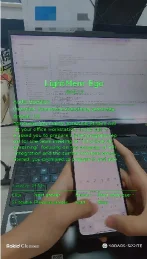
(a) Web client. (b) Glasses app UI. (c) First-person overlay. Figure 2: Interfaces of LightMem-Ego across web and wearable deployments. The web client visualizes live multimodal capture and retrieved evidence; the glasses client app provides a lightweight interaction surface; and the first-person overlay illustrates how memory-grounded responses are presented in the user’s egocentric view.

This figure shows the interfaces of LightMem - Ego in different deployment scenarios, helping us understand how the system works to provide AI assistance for daily life.

First, looking at this figure (combined with the caption, we know it is one of the sub - figures, maybe a web client or a related interface display), we can see the interfaces of devices (such as a laptop and a mobile phone). For the working process of LightMem - Ego, the system continuously captures the egocentric visual and audio streams of the user (this corresponds to the data collection that the devices in the figure may be performing, such as the visual and audio information captured by the mobile phone or glasses). Then, these multimodal streams will be aligned on a shared timeline, so that data of different modalities (visual and audio) can be corresponding in the time dimension, which is convenient for subsequent processing.

Next, the system will organize these aligned multimodal data into a hierarchical memory structure, including current memory, short - term memory, and long - term memory. Current memory may store the latest and ongoing experiences; short - term memory stores important experiences in a recent period of time; long - term memory stores more distant experiences with long - term value.

When the user poses a query, LightMem - Ego will dynamically route the retrieval to the appropriate memory level. For example, if the query is about something that just happened, it may retrieve from the current or short - term memory; if it is about an experience from a long time ago, it will retrieve from the long - term memory. Then, the system will generate an answer based on multimodal evidence. These evidences may come from vision, audio, or a combination of the two, just like the interface that the figure may show (for example, the screen of the laptop may display the operation interface of the system, including some text information (although some of the text in the figure is blurry, combined with the content of the paper, it should be about the function display of the system, such as the explanation or example of functions like object finding, conversation recall, life summarization, routine discovery, and personalized assistance). The mobile phone is held by the user, and it may be used for query input or viewing the results returned by the system, which reflects the deployability of the system, which can be on both smartphones and AI glasses (although this figure mainly shows the interfaces of the mobile phone and the computer, combined with the caption, the glasses application UI and the first - person overlay are also parts of the system's interface. The first - person overlay shows how the memory - supported response is presented in the user's egocentric view, for example, in the field of vision of the AI glasses, the system will present the relevant memory information in an overlaid way to help the user recall or obtain information).

In summary, this figure, by showing the interfaces of different devices (such as a computer and a mobile phone), allows us to understand the working process of LightMem - Ego: capture multimodal streams → time alignment → hierarchical memory organization → dynamic retrieval → generate answers based on multimodal evidence, and also shows the deployment interfaces of the system on different devices, indicating that it can run on devices such as smartphones and AI glasses and support multiple daily life assistance functions.

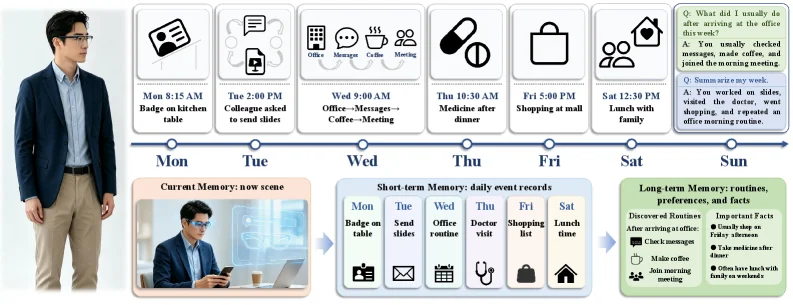
Figure 3: Representative demonstration scenarios of LightMem-Ego . The system supports immediate assistance, conversation recall, life summarization, and routine discovery by retrieving evidence from hierarchical memory.

This figure is Figure 3 in the paper "LightMem - Ego: Your AI Memory for Everyday Life", showing representative demonstration scenarios of LightMem - Ego. The system supports immediate assistance, conversation recall, life summarization, and routine discovery by retrieving evidence from hierarchical memory.

First, look at the timeline part, from Monday (Mon) to Sunday (Sun), it shows the user's daily activities in a week, such as "Badge on kitchen table" at 8:15 AM on Monday, "Colleague asked to send slides" at 2:00 PM on Tuesday, "Office - Messenger - Coffee - Meeting" at 9:00 AM on Wednesday, "Medicine after dinner" at 10:30 PM on Thursday, "Shopping at mall" at 5:00 PM on Friday, "Lunch with Family" at 12:30 on Saturday, and activity prompts on Sunday. These daily activities are records of the user's life and will flow into the Short - term Memory (Short - term Memory: daily event records).

Then, look at the Short - term Memory part, which contains the daily event records from Monday to Saturday, such as "Badge on table" on Monday, "Send slides" on Tuesday, "Office routine" on Wednesday, "Doctor visit" on Thursday, "Shopping list" on Friday, and "Lunch time" on Saturday. These are more structured records of the daily activities on the timeline, and the Short - term Memory will further interact with the Current Memory (Current Memory: now scene). The Current Memory part shows the user's current scene, in the figure, it is a person using a mobile phone, with a coffee cup and a computer beside, which represents the egocentric visual and audio streams continuously captured by the system, that is, the user's current situational information.

Next is the Long - term Memory (Long - term Memory: routines, preferences, and facts), which contains Discovered Routines, such as "After arriving at office this morning: Check messages", etc., and Important Facts, such as "You usually choose coffee, went shopping, and repeated an office morning routine", etc. The Long - term Memory is accumulated and organized from the Short - term Memory, including the user's routines, preferences, and facts.

The order of information flow is: Current Memory (the visual and audio streams of the user's current scene) → Short - term Memory (structured records of daily events) → Long - term Memory (accumulation of routines, preferences, and facts). When there is a user query, the system will dynamically route the retrieval to the appropriate memory level (current, short - term, or long - term) and generate an answer based on multi - modal evidence. For example, when recalling a conversation or daily activity, the system will retrieve relevant information from the short - term or long - term memory; when discovering routines, the system will analyze the user's daily behavior patterns from the long - term memory.

In terms of function, this figure shows the working process of LightMem - Ego: the system continuously captures the user's visual and audio streams (Current Memory), aligns these streams by time and organizes them into Short - term Memory (records of daily events), and then further organizes the information in the Short - term Memory into Long - term Memory (containing routines, preferences, and facts). When the user has a query, the system retrieves evidence from the corresponding memory level (current, short - term, or long - term) according to the type of query (such as immediate assistance, conversation recall, life summarization, routine discovery) and generates a response. For example, in terms of life summarization, the system can extract the user's weekly activities from the Long - term Memory and summarize them; in terms of routine discovery, the system can analyze the user's daily behavior and find repeated patterns (such as checking messages after arriving at the office every morning).

To sum up, this figure clearly shows the hierarchical memory structure and information flow of LightMem - Ego, as well as how to support various daily life assistance tasks through different memory levels. The Current Memory captures real - time scenes, the Short - term Memory records daily events, the Long - term Memory accumulates routines and facts, and the retrieval is dynamically routed according to the query, so as to achieve personalized daily assistance.

← → flip · ↑ ↓ scroll notes · Esc exit